Case study
Claude Usage Pacer


A self-built menu bar app that reads the authoritative usage API, models burn-down against my working hours, harvests idle overnight capacity through scheduled work, and nudges my phone. It replaced a third-party tool that had quietly stopped working.
- Role
- Architect, operator, and engineer (AI-paired)
- Year
- 2026
- Client
- Personal applied-AI build
What it does
Claude’s Max plan meters usage two ways at once. There is a rolling five-hour window that starts on your first message and resets five hours later, and there is a weekly cap that resets every seven days across every surface you use. Paying for the plan and then leaving a third of the weekly allowance unused is the quiet, common waste. The Usage Pacer is a small macOS menu bar tool that exists to stop that happening.
It shows both meters at a glance, a five-hour indicator and a weekly indicator, each with its own colour and percentage. Behind that glanceable read, it models how fast I am spending the weekly budget against how much of the week is left, and works out whether I am on track to use almost all of it while still holding back enough for the routine admin that has to happen later in the week. When I drift under pace it nudges my phone. When I am about to exhaust the week early it tells me to ease off.
The first thing it did, before any of that, was tell me the tool I was replacing had been dead since breakfast.
The problem
Two reset cycles pulling in different directions is harder to manage by feel than it sounds. The five-hour window rewards bursts. The weekly cap rewards spreading the load. Aim only at the weekly number and you can hit the short-term wall mid-afternoon with plenty of weekly budget left. Aim only at the five-hour window and you drift toward the end of the week with a quarter of what you paid for unspent.
The goal I wanted the tool to hold was specific: use close to one hundred percent of the weekly allowance, while always keeping a reserve in hand for the routine jobs that run later in the week, and never run dry by accident. Off-the-shelf monitors show you the current numbers, but a number is not a plan. None of them paced.
And the one I was running had a deeper fault. It was showing me a comfortable two percent when I had in fact been working for hours. It had not crashed. It was simply reporting a figure that had frozen at dawn, which is the most dangerous failure a monitor can have, because you keep trusting it.
Where the numbers come from
The right data turned out to exist, just not where a casual tool would look. The authoritative source is an undocumented endpoint, the OAuth usage API, authorised with the Claude Code token held in the macOS Keychain. It returns a structured list of limits: the five-hour session limit, the weekly all-models limit, and a model-scoped weekly limit, each with a utilisation percentage and a reset time. These are the same figures the official usage screen shows, so there is no page scraping and no guessing. The collector reads that list, tracks whichever weekly bucket is closest to its cap rather than assuming the all-models one always binds, and writes a small rolling state file with history.
The reason the old tool had died was sitting one layer down. The access token expires roughly every eight hours, and only the refresh token can mint a new one. When I opened the bonnet, the Keychain’s refresh token was empty, the token endpoint sits behind bot protection so a script cannot renew it directly, and the headless refresh had been returning an authentication error since 06:47 that morning. The fix was a single interactive re-login to repopulate the refresh token, after which the collector keeps it alive by letting the official client do its own refresh whenever the token nears expiry. The lesson I kept is the one the dead tool taught for free: a monitor that fails silently is worse than no monitor at all.
The pacing model
The core is a burn-down model. The weekly target is one hundred percent minus a reserve, fifteen percent by default. From there the tool draws the ideal spend line to the weekly reset, but weighted by my actual working hours rather than spread flat across the clock, so it expects consumption when I am at the keyboard and none while I sleep. It measures the recent burn rate, projects where the week will land, and classifies the moment as behind, on track, or over. The reserve is adaptive: protected early in the week, then relaxed toward zero in the final forty-eight hours if I am tracking under budget, so the advice flips from “hold some back” to “use it or lose it” at the point where that switch is actually correct.
The five-hour window needed separate handling because it is not a fixed clock. It begins on first use and migrates: go idle for a while, and the next window does not start until you next pick up. So the model walks real windows forward from the live one, skips my sleeping hours, and counts how many windows I can still actually start before the weekly reset. It also separates a fresh window I could open right now from one I am already halfway through, because the right nudge is different in each case.
Capacity and harvest
The insight that reshaped the model was that overnight is not dead time. A long unattended run, or a routine scheduled job, can consume the windows I would otherwise waste while asleep. So capacity splits in two: attended windows I run by hand during working hours, and harvestable windows that automation can run overnight. The tool counts both, and treats full weekly use as reachable through harvest even when my hands-on windows alone could never get there.
That came with a scheduling discipline I had been getting wrong. Because the five-hour window is fixed from first use, a routine job firing at 04:03 opens a window that does not reset until 09:03, which means I sit down at 08:00 already mid-window, on capacity that job has been quietly eating. The fix is a clearance rule: any out-of-hours job must start by 03:00 so its window clears before my 08:00 start, leaving me a fresh one. I moved seven routine jobs into a single overnight clearing window and emptied the pre-work zone completely.
Failure and fix
The pacing brain shipped with a bug that a test caught before it ever reached the menu bar. On the first live runs the status flipped to “over”, telling me to ease off when I had used eight percent of the week. The cause was the burn-rate estimate. With only minutes of history, a four-point climb over a quarter of an hour extrapolated to a wildly steep rate, which projected the week landing several hundred percent over. A scenario test with a fixed clock made it plain: short, steep history produces nonsense rates. The fix was to refuse to trust a rate until there is at least an hour of real spread behind it, and to fall back to the window-count heuristic until then. The false alarm disappeared, the legitimate behind, on-track and over cases still held, and the test stayed in the suite.
The honest trade-off, in print: the tool depends on an undocumented endpoint and a token-refresh path that is not officially supported. If either changes, the data layer breaks. It will break loudly, with the menu bar showing a dash rather than a wrong number, because I would rather it go blank than lie. That is the same lesson the dead predecessor taught.
Open work
The five-hour window has a cap of its own that the model does not yet enforce as a hard ceiling. Once a few weeks of history reveal how much weekly budget one full window actually consumes, the tool can tell me when one hundred percent is physically out of reach and give the realistic maximum instead of an unreachable target.
Overnight harvest only fires while the desktop app is open. The always-on machine covers it, but it is a dependency worth naming rather than hiding.
The native rewrite that this section originally called for is done, and the surface has since spread to the phone and the iPad with widgets on both screens. What has not moved is the engine: it is still Python, still tied to the one Mac that holds the credential, and the Pi that now serves every other device only ever relays what that Mac has already worked out. Porting the engine to Swift would remove the last single point of failure in the chain.
I put this together in an afternoon, but the part worth keeping is not the speed. It is that I instrument the things I rely on, check the number against its source rather than trusting the dial, and write the failure mode down next to the feature. The pacer earns its place in the menu bar precisely because it would rather show nothing than show me something false. That is the standard I bring to systems other people depend on, not just my own.
Updates
-
22 June 2026
Closing the loop when you are locked out
Since the write-up, the tool stopped being only a pacer and started handling the moment you actually hit the wall: it now tells you, across your devices, exactly when you can resume, and the menu bar readout was tightened to show both clocks at a glance.
The original build was about not under-using the week. The gap it left was the opposite moment: when a window is genuinely maxed and the only useful question is "when can I start again". Three changes since launch close that loop.
The first is calendar reset reminders. From the menu bar I can drop a synced event, with an alert, at the exact moment the five-hour or weekly window reopens. Because it lands in an iCloud calendar it rings on the phone, Watch and Mac, so the reminder reaches me whether or not the laptop is in front of me. Repeated clicks de-duplicate rather than pile up.
The second makes that automatic. A lockout watcher runs on every cycle, and when a limit hits its ceiling it creates the reset reminder and sends a single message telling me when usage resumes, once per cycle so it never nags, and quiet overnight so it does not wake me. It proved itself the day it shipped: while I was building it the five-hour window hit 100% for real, and the watcher fired the calendar reminder and the text on its own, exactly as intended. The nicest kind of test is the one the world runs for you.
The third is a quieter change to the readout. The menu bar now shows both clocks side by side: for the five-hour and the weekly limit, a countdown to reset and the percentage used, with the durations formatted to two units so they stay compact (5d3h when days out, 3h50m under a day). To save width I dropped the status dots and colour the text instead, so the five-hour figure shifts green to amber to red as it fills and the weekly figure carries the pacing colour. Same information, less furniture.
None of this changed the core. The data layer, the burn-down model and the honest rule of showing nothing rather than something false are all untouched. These are the edges: the tool now covers the full arc from using more of the week to telling me precisely when I am allowed back in, and it does it across every device without my having to ask.
-
8 July 2026
The native rewrite, and aiming at the whole budget
The open-work section promised a native rewrite; it is done. The pacer is now a SwiftUI menu bar app with an interactive chart, it writes its own guidance with an on-device model, and the target moved from a fixed reserve to aiming at the whole budget while inferring how much to hold back for the daily routine work.
The write-up ended by naming a native rewrite as open work. That is now the tool I run. The Python engine that reads the usage API and models the week is untouched and still does the thinking; what changed is the surface. A SwiftUI menu bar app reads the same state files and renders them, and it ran in parallel with the old Python menu bar until it had matched it feature for feature, at which point the old one was retired. Keeping the proven engine and rebuilding only the glass was the low-risk path, and it means the data and pacing layers carried over exactly as the original write-up predicted.
The headline of the new surface is a proper chart rather than a pair of numbers. Open the menu and the week is a burn-up: actual usage so far, an ideal pace line weighted to my working hours, my typical week drawn from past weeks so I can see whether this one is heavier or lighter, and a projection from the rate so far that runs on to the point it would hit the cap and labels the day I would run out. Below it a slim five-hour meter shows fullness and the reset clock, because pace inside a five-hour window is a cap to respect, not a target to chase.
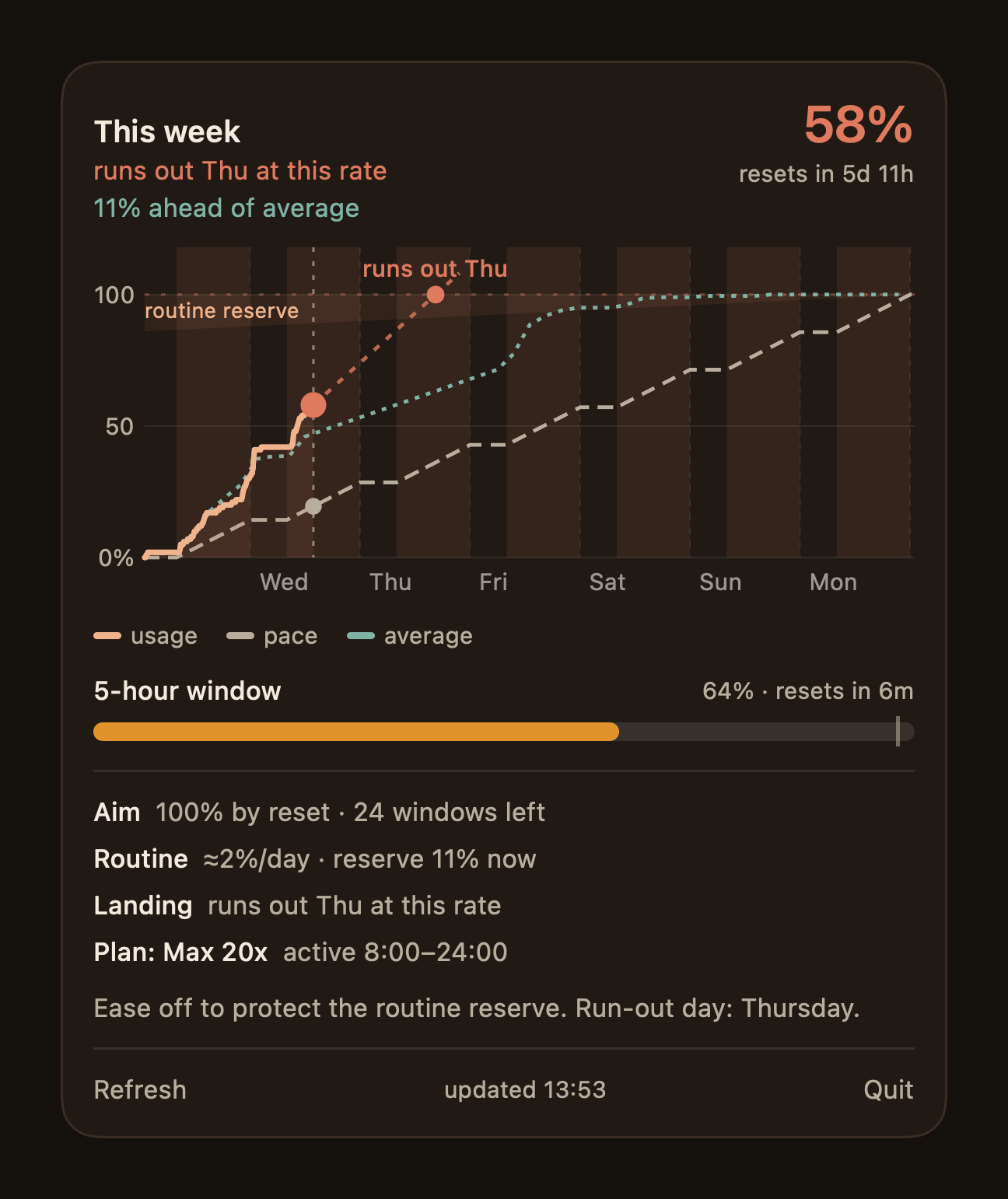
The new popover. The week as a burn-up, actual usage against a working-hours pace line and the typical week, with the projection meeting the day it would run out and the routine reserve tapering to nothing at the reset. The line at the foot is written on the machine itself, by an on-device model. The bigger change is conceptual. The first model aimed at eighty-five percent, a flat fifteen held back. That was always a rough proxy for the real goal, which is to use the whole budget while never starving the small automated jobs that run every day. So the target is now the full hundred, and the reserve is inferred rather than fixed. The tool separates routine work from attended work by when it happens, learns roughly how much the daily routine consumes, and holds back only that much for each day still to come. The reserve shrinks as the week ends, drawn as a band that tapers to nothing at the reset, and the warning escalates as usage approaches it. If the current rate would empty the budget before the week is out, it names the day the routine work would start being starved.
The line of guidance under the chart is now written on the machine itself. Instead of a templated sentence, an on-device foundation model takes the whole picture, usage, pace, the run-out day, the reserve and the five-hour window, and writes a calm sentence or two: push, hold, or ease off to protect the routine. It runs locally, so it costs nothing, needs no network, and keeps the numbers on the device.
Two smaller things are in keeping with the first build. The app builds and verifies from the command line with no project file, and a headless self-test renders the label, the chart and the whole popover to images, so a change can be checked without opening the menu. And a fiddly display bug earned its own fix: a menu bar sitting over a dark wallpaper reports itself as a light appearance even while it draws its text white, so the countdowns went dim until the label was made to read on either background. Small, but the kind of thing you only catch by looking at the real thing rather than trusting it looked right.
-
9 July 2026
Every limit, and the reset it caught
Anthropic meters more than one weekly limit and occasionally resets usage mid-cycle after an incident. The tool now reads every bucket, and when a reset landed this week it caught it, named the likely cause from the status page, and corrected its own advice.
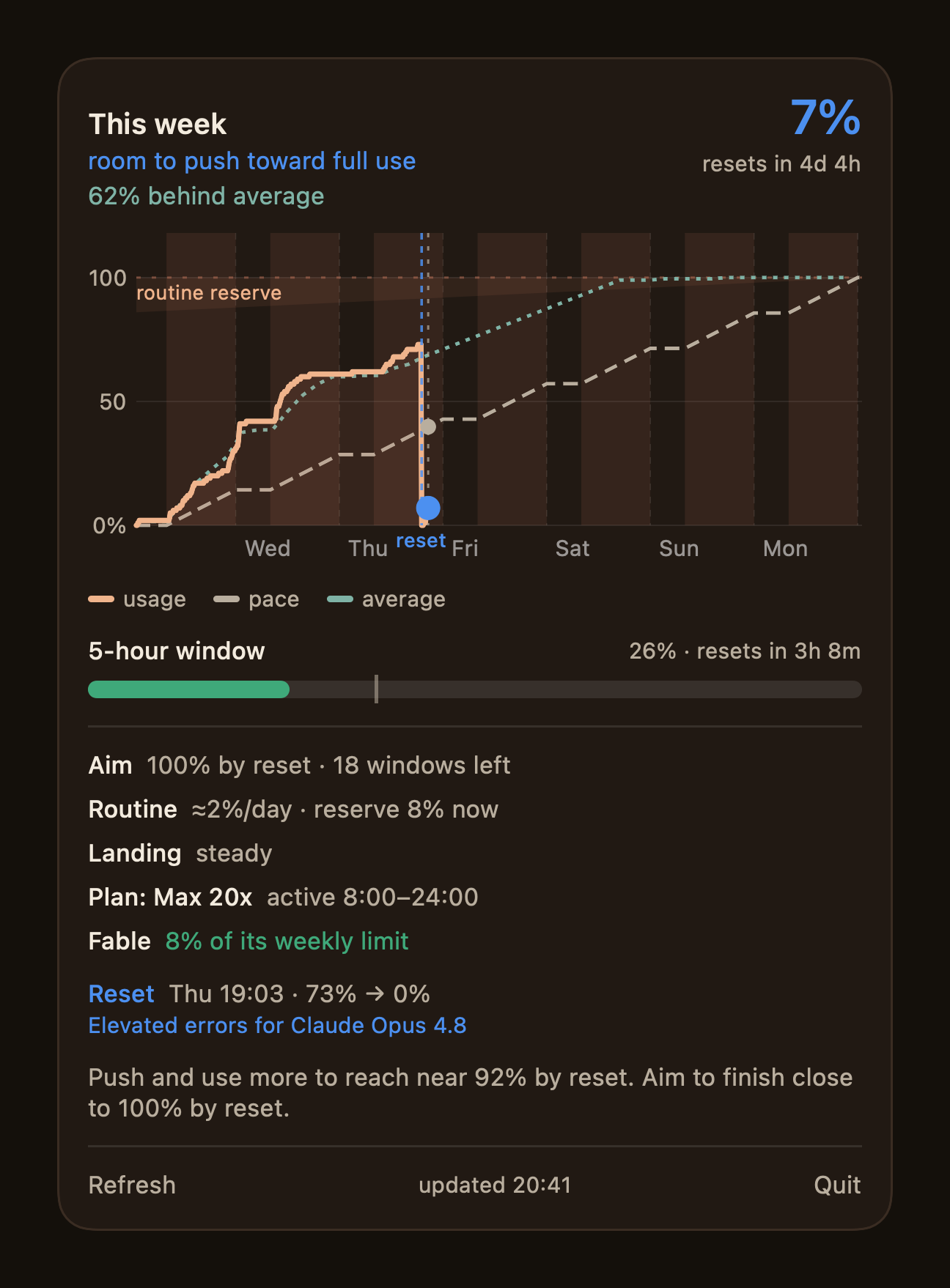
The tool after Anthropic reset the week mid-cycle. Usage drops to nothing at the marked reset, the cause is pulled from Anthropic's status page and linked, the model-scoped Fable limit sits alongside the all-models one, and the read corrects itself to push rather than ease off. The usage API does not report one weekly number, it reports several. There is the all-models cap, and a model-scoped sub-limit whose model rotates as Anthropic points it around: it was Sonnet, and this week it is Fable. The tool reads all of them dynamically now and gives each its own line, so a sub-limit quietly filling up is visible even while the headline cap still has room, and it keeps up on its own when the scoped model changes underneath it.
The bigger addition is for a habit of Anthropic's. They periodically reset weekly usage in the middle of a cycle, usually after an incident, and this week they did. My weekly usage fell from seventy-three percent to zero on a Thursday evening, nowhere near the scheduled Tuesday reset. The tool treats that for what it is, an anomalous drop that is not the weekly reset, marks it on the chart with its own line, and logs it. It also re-anchors the pacing to the reset, so the projection measures my rate from the fresh start rather than being dragged down by usage that no longer counts.
A reset with no explanation is just a mystery you have to go and solve. So when the tool records one it checks Anthropic's own status page, and if an incident lines up in time it attaches the likely cause with a link. This one it labelled "Elevated errors for Claude Opus 4.8", pulled straight from their status feed. When a fresh reset lands it also notifies me, with the before and after and the cause, so the first I know of it is a plain explanation rather than a gauge that has mysteriously emptied.
There was a sting in the tail. In the hour after the reset the on-device summary got it backwards. On barely any fresh data it told me to ease off when the honest read was the opposite, that I was well behind and should push, and it even invented a run-out day that appeared nowhere in the numbers. It was the same short-history trap the very first build had already learned to distrust, sprung this time by a reset rather than a cold start, so the projection now waits for a few hours of real post-reset data before it will speak. But the deeper fix was not a bigger model. It was to stop asking the small one to reason over the figures at all. The code decides the recommendation from the pacing state, and the model's only job is to phrase it in a sentence. That is the same rule the rest of the tool already lives by: do the honest calculation, then let the words describe it, never invent it. A monitor that would rather show nothing than something false has to hold its language to the same standard.
-
14 July 2026
A second provider, and the panel that lied
The pacer now watches Antigravity's budgets alongside Anthropic's. Adding them caught a panel that had reported zero usage for three days, and a projection confident enough to name a run-out day on six percent of a week's evidence.
The tool had a Gemini panel for three days. It never once told the truth.
Across 4,271 recorded readings it said the same thing every time: every budget full, nothing used. The cause was not a broken request. It was a request that worked perfectly, against the wrong thing. The collector authenticated as the Gemini command line tool while the actual work was happening in Antigravity, and Google's backend resolves quota per client identity. The token was faithfully reporting the untouched buckets belonging to a tool I was not using. A monitor returning a real number about the wrong subject is the same failure the dead predecessor taught me to fear, wearing a better disguise.
The fix was to ask as Antigravity rather than as the command line tool. It meters four budgets: a Gemini pool and a Claude and GPT pool, each with a rolling five-hour window and a weekly one. The first honest reading was not comfortable. The Claude and GPT pool was sixty-eight percent through its week, one day into it.
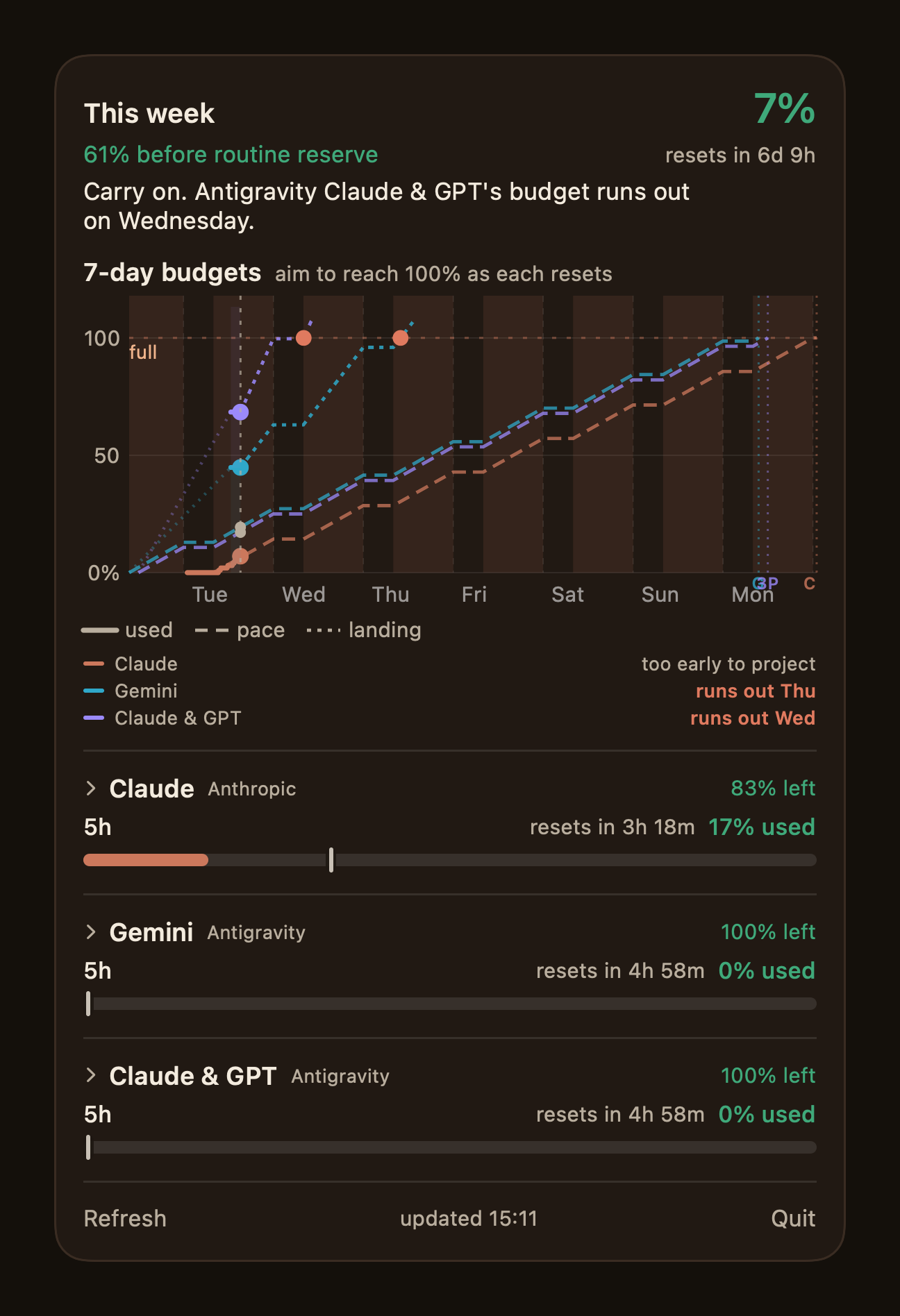
Three budgets, one chart. Colour says which provider, line style says which quantity: solid for what was spent, dashed for the pace it must hold, dotted for where it lands. Claude declines to guess. The other two are already projected to run out days before they reset. Then came the reframe. I had built the shared view around a distinction that turned out to be false: Claude is a budget you have paid for and want to fill, Antigravity is a cap you must not hit, so the same rising line meant opposite things and the chart needed a warning label to explain itself. That is wrong. Both are budgets you have paid for that reset on a clock, and for both the aim is to land near a hundred percent exactly as they reset. Running out of Antigravity on Wednesday is the same failure as running out of Claude on Wednesday. That reframe matters, because it collapsed three chart implementations into one. There is now a single chart in the app, drawn three times.
The harder question was the prediction line. Claude had one and Gemini appeared not to, and the reason was worse than a missing feature. They were projected by two different functions that disagreed. Claude extrapolated its rate in wall-clock time, so its chart shaded my working hours, bent the pace line around them, and then drew a projection straight through the night as if quota were burnt while asleep.
Unifying them surfaced the real bug. A rate taken over a sliver of elapsed time is division by nearly nothing. Seven percent spent against six percent due reads as "you will land at a hundred and seventeen, and run out on Thursday" for someone fourteen hours into a seven-day week. The engine had been doing exactly this all along and I had never looked: it reports a hundred and thirty two percent landing for a user sitting at seven percent, while calling that same user behind in the same breath. Carried into the chart it flipped the status to over, and would have told me to ease off with six days and ninety three percent of the week still in hand.
So the tool now refuses. No projection until a working day of the window has actually passed, and where the line would have been it says "too early to project" rather than a number. That is the founding rule applied to a place I had not thought to apply it: show nothing rather than something false. A figure Google omits is reported as "no data" for the same reason, and never quietly defaulted to full, which is the trap that would have hidden the original lie for another three days.
One number to close on. The collector had been polling Google about fourteen hundred times a day. It now holds a staleness gate that tightens when a budget is nearly spent, and makes roughly three hundred calls instead. The tool became more honest and less rude in the same week.
-
29 August 2026
Off the desk, and onto every screen
The pacer was only ever useful while sat at the Mac that ran it. It is now one app across macOS, iPhone and iPad with Home and Lock Screen widgets, reading the same engine through a Raspberry Pi and an authenticated tunnel, so the read travels with me instead of staying on the desk.
The pacer had a shape problem rather than a feature problem. The engine reads the usage API, models the week and writes its state to disk, and the menu bar app renders that state. Both halves lived on one Mac, which meant the only place I could see whether I was ahead or behind was the machine I was already sitting at. The moment I stood up, the number I was pacing against went away.
Three changes fix that, and none of them touched the pacing model.
The Mac that runs the engine now publishes its state to the Raspberry Pi at the end of every cycle, and the Pi serves it read-only over the local network, behind a bearer token. That is a deliberate split of jobs. The engine still has to run where the Claude credential lives; the Pi is already on all the time and is a much better thing to point four devices at than a laptop with a lid.
Serving it beyond the house needed a second layer, because a token on the origin is the wrong place to stop unwanted traffic. The Pi already runs a Cloudflare Tunnel for other things, so the snapshot got its own hostname on it, fronted by a Zero Trust policy that only accepts one service token. Requests without it are refused at the edge and never reach the Pi at all; the origin's own token then still has to be right. On the home network I can point the app at the Pi directly and skip the round trip.
The surface is now one app rather than three. macOS, iPhone and iPad build from a single target, and a WidgetKit extension gives Home Screen and Lock Screen widgets showing each budget's percentage, how it is standing against pace and the time to reset, with the same one-line verdict the popover carries. The menu bar app on the Mac is the same code with the same shared core. That matters more than it sounds: the summary sentence, the burn-up chart and the per-provider sections are computed once, so a phone and a menu bar cannot quietly disagree about how the week is going.
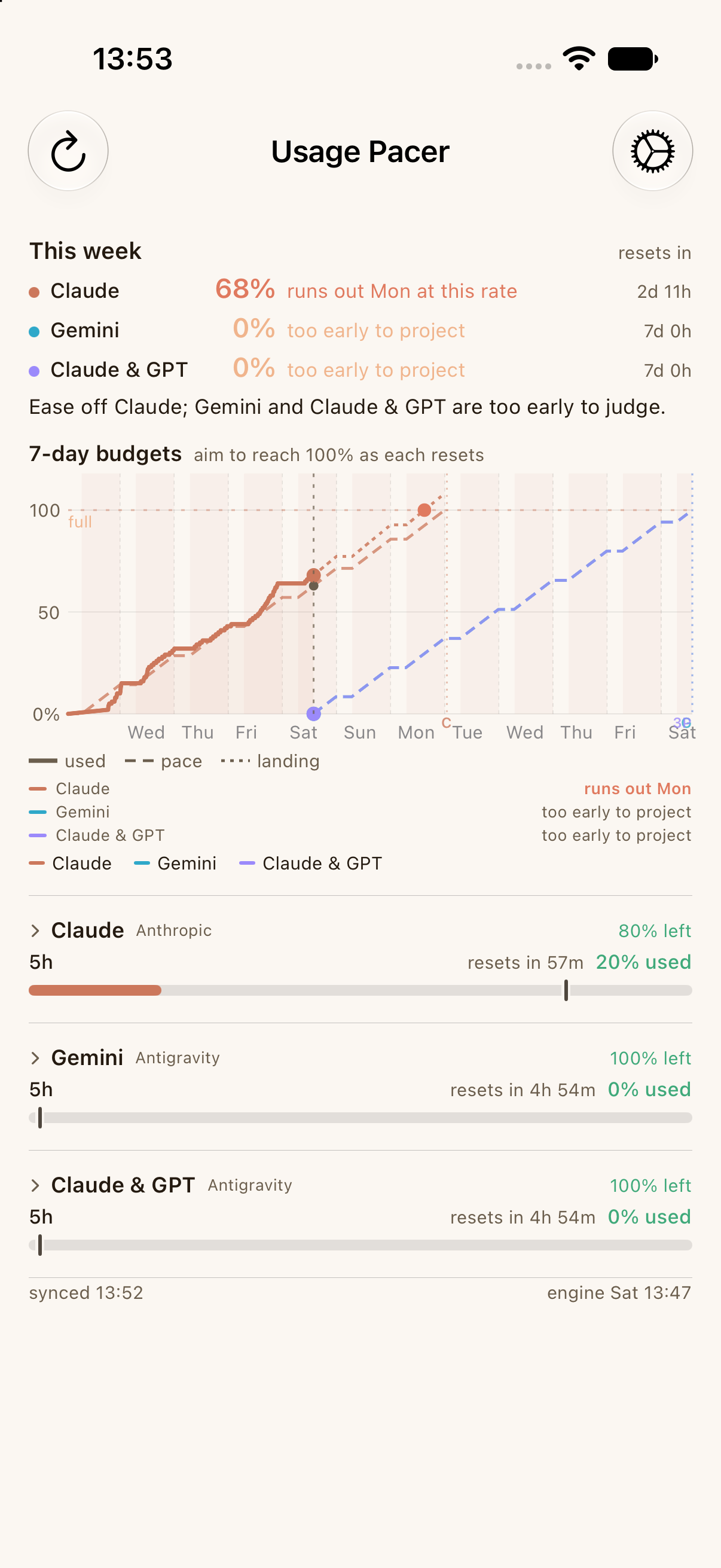
The same read on the phone: three budgets, where each stands against its pace, and the day the weekly one runs out at the current rate. The engine still runs on the Mac; this is reading it through the Pi. Credentials were the last piece of friction. The host address, the origin token and the service token now live in one iCloud Keychain item shared by the app and its widgets, so they are entered once on one device and every other device picks them up. Distribution went the same way: an internal TestFlight build for both platforms, uploaded straight from the command line with an App Store Connect API key, rather than a development build I have to reinstall by cable.
The failure states got the same treatment as everything else in this tool. A wrong origin token says the snapshot host rejected the token; a missing service token says Cloudflare Access rejected it; an unreachable host says so plainly. The one thing the app will not do is show a stale number as though it were current, which is the fault that started this project in the first place.